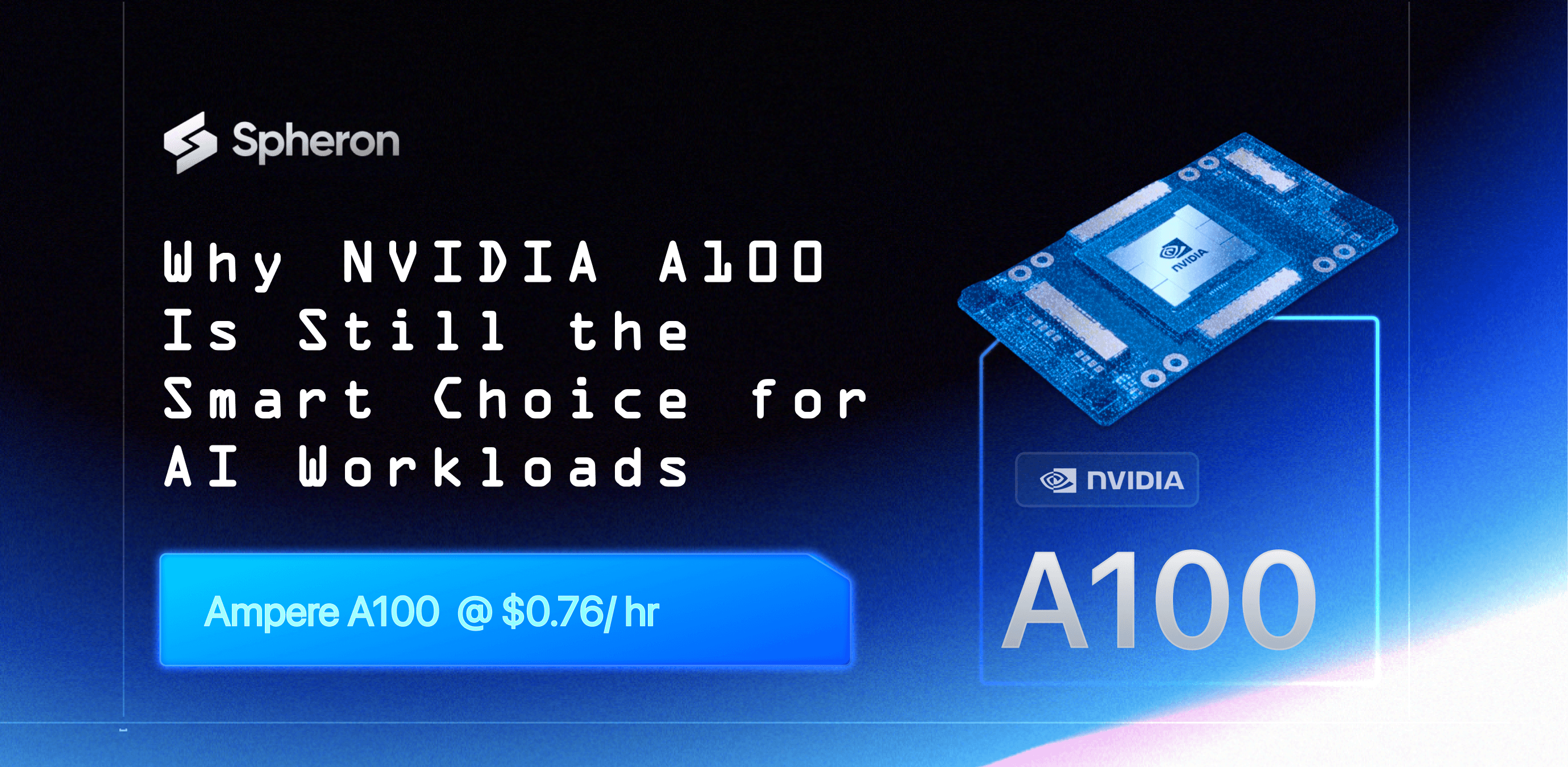
The NVIDIA A100 is one of the most important GPUs ever built for artificial intelligence. It powered the first wave of large-scale deep learning systems, enabled modern transformer training, and still runs a large share of production AI workloads today.
Even with newer GPUs in the market, A100 remains relevant because it balances performance, memory capacity, ecosystem maturity, and cost better than almost any other accelerator.
Spheron AI makes NVIDIA A100 accessible without long contracts, hidden pricing, or artificial scarcity. You deploy real A100 GPUs across spot and on-demand options, backed by multiple providers, with full clarity on region, configuration, and cost. The A100 is not a legacy GPU. It is a stable, well-understood platform that continues to deliver strong value for training, fine-tuning, and inference.
Why NVIDIA A100 Still Matters
The A100 was NVIDIA’s first GPU designed specifically for large-scale AI, not just graphics or HPC with AI added on top. Built on the Ampere architecture, it introduced features that reshaped how AI workloads run in production.'
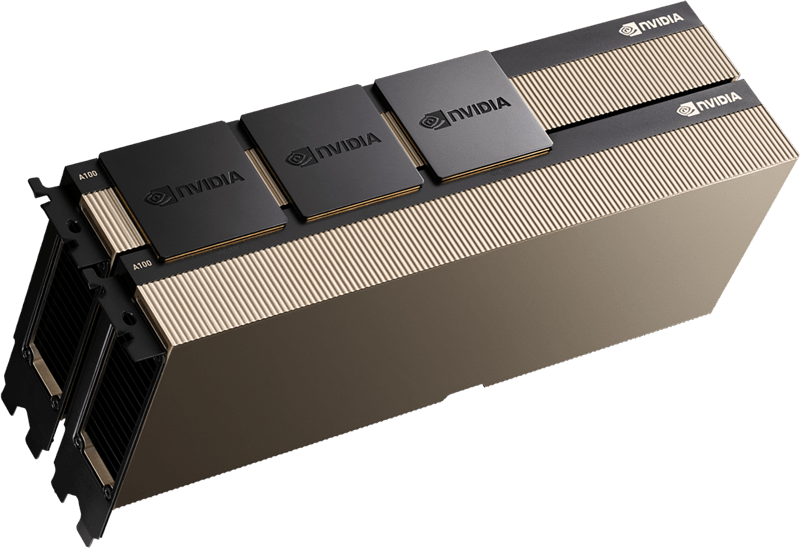
It brought high-bandwidth HBM2e memory, third-generation Tensor Cores, and Multi-Instance GPU support into the data center. These features solved real problems. Models stopped starving for memory bandwidth. Training jobs scaled more efficiently. Inference systems became easier to isolate and manage.
Most importantly, the software ecosystem around A100 is mature. Frameworks like PyTorch, TensorFlow, JAX, TensorRT, and RAPIDS have been tuned for years on this hardware. Engineers know how A100 behaves under sustained load. That reliability still matters more than raw benchmarks.
A100 sits in a sweet spot. It is powerful enough to train and fine-tune large models up to roughly 30B parameters comfortably, and even larger models with mixed precision and sharding. It handles production inference for chat systems, recommendation engines, and vision models without surprises. It supports MIG, which allows teams to split a single GPU into multiple isolated instances.
For many teams, A100 is the most cost-effective way to run serious AI workloads without paying a premium for bleeding-edge hardware they may not fully utilize.
Why Choose Spheron AI for A100
Most A100 offerings hide important details until late in the buying process. You often do not know whether you are getting PCIe or SXM, spot or reserved, or which region the GPU actually runs in.
Spheron AI takes a different approach.
You see the configuration upfront.
You know the form factor.
You know the region.
You know the pricing model.
Spheron aggregates A100 supply from multiple providers. This reduces dependency on a single vendor and keeps pricing close to market reality. It also improves availability, which matters as A100 demand remains high despite newer GPUs entering the market.
This model lets teams start small, test workloads, and scale only when the data supports it.
A100 Deployment Options on Spheron AI
Spheron AI offers NVIDIA A100 across multiple configurations so teams can choose based on workload needs instead of marketing claims.

Spheron AI offers NVIDIA A100 in multiple configurations, each suited for different workload profiles.
A100 80GB SXM4 – Spot Virtual Machines
This is the most cost-efficient A100 option on Spheron.
Spot pricing starts at 1x $0.76/hr, which is significantly lower than most hyperscalers and GPU clouds. These instances include 22 vCPUs, 120GB system RAM, and local SSD storage. They are currently available in the Finland region and backed by multiple providers.
This configuration works well for experimentation, fine-tuning, inference workloads, and batch training jobs that can tolerate interruption. Many teams use this tier to validate workloads before committing to higher-cost GPUs. Spheron also supports scaling from single GPU to multi-GPU clusters, with pricing that remains linear and predictable.
A100 DGX – Virtual Machines
For users who want a slightly different balance of compute and storage, Spheron offers A100 DGX-based virtual machines. Pricing starts at $1.10 per GPU per hour. These instances include 16 vCPUs, 120GB RAM, and 1TB of storage. They are available in US regions.
DGX-backed A100 instances suit users who want NVIDIA-certified system layouts with higher local storage, often for training pipelines that rely on local datasets.
A100 SXM4 – On-Demand Virtual Machines
For users who need more stability than spot but do not want long commitments, Spheron offers on-demand A100 SXM4 virtual machines. Prices start at 1x $1.07/hr, depending on provider and region. These configurations typically include 14 vCPUs, 100GB RAM, and 625GB of storage.
Multiple providers support this tier, including Massed Compute and Sesterce, with availability across several US and EU regions. This option fits production inference, steady workloads, and internal AI platforms.
A100 PCIe – Virtual Machines
A100 PCIe instances are available for workloads that do not require NVLink or SXM-level interconnects.
Pricing starts at 1x $1.58/hr. These instances include 12 vCPUs, 64GB RAM, and local SSD storage. They are available across multiple regions through Sesterce. PCIe A100 works well for inference, data processing, and smaller training jobs where GPU-to-GPU bandwidth is not critical.
Understanding SXM vs PCIe for A100
This distinction matters more than most pages explain.
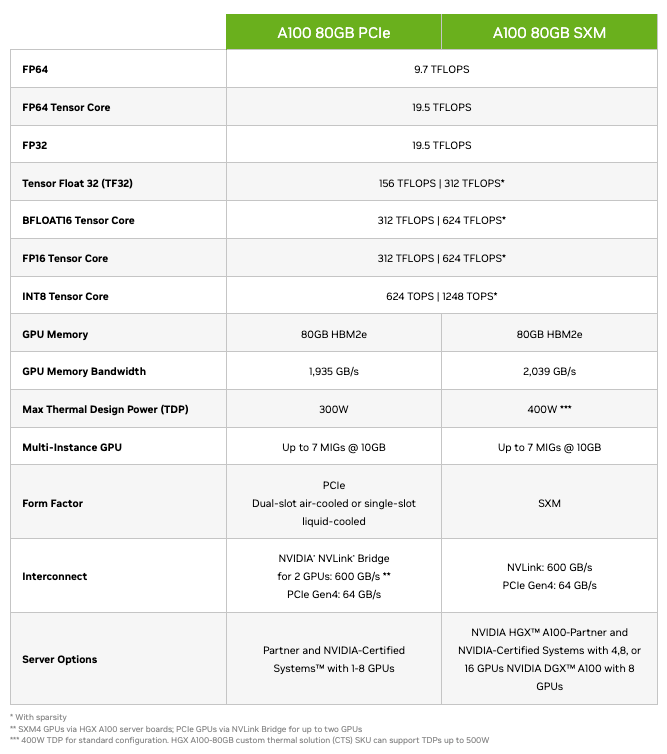
A100 SXM offers higher memory bandwidth and NVLink support, which improves performance for multi-GPU training and memory-intensive workloads. PCIe A100 trades some of that performance for lower power draw and easier deployment.
If your workload involves distributed training, large batch sizes, or heavy GPU-to-GPU communication, SXM is the better choice. If you focus on inference or single-GPU jobs, PCIe often delivers better cost efficiency. Spheron AI exposes this difference clearly so teams can choose intentionally.
The A100 introduced third-generation Tensor Cores, which dramatically improved mixed-precision training and inference. It also supports TF32, allowing teams to run FP32-like workloads with much higher throughput and minimal code changes.
HBM2e memory provides up to 80GB per GPU with nearly 2 TB per second of bandwidth. This allows larger models and datasets to stay resident on the GPU instead of spilling into system memory.
Multi-Instance GPU support lets a single A100 split into up to seven isolated GPU instances. This feature is especially useful for inference platforms and shared environments.
What These Capabilities Mean for Real Workloads?
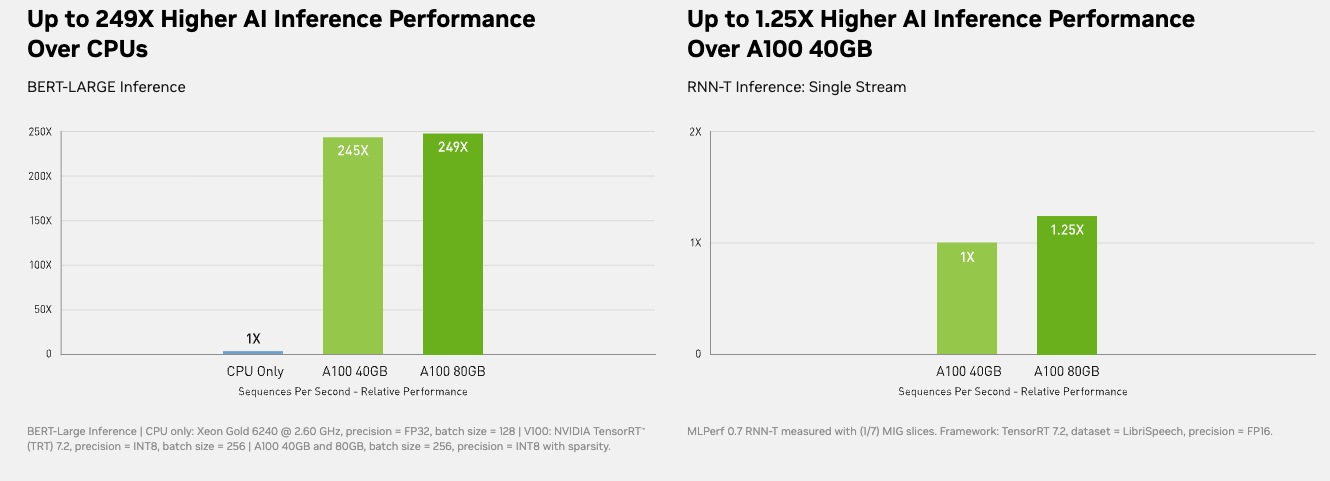
In real systems, A100 reduces training time significantly compared to older GPUs. Teams often see faster convergence because they can increase batch sizes without hitting memory limits. For inference, A100 delivers stable latency and high throughput. MIG allows teams to isolate workloads cleanly, which improves utilization and reduces operational complexity.
Data analytics workloads also benefit from A100’s bandwidth and CUDA ecosystem, especially when using RAPIDS or GPU-accelerated SQL engines.
Ampere Architecture and Tensor Cores
At the heart of A100 are NVIDIA’s third-generation Tensor Cores. These Tensor Cores are responsible for accelerating matrix operations, which dominate AI training and inference.
A100 supports multiple numerical formats, including FP32, TF32, FP16, BF16, INT8, and INT4. This flexibility allows the same GPU to handle training, fine-tuning, and inference efficiently.
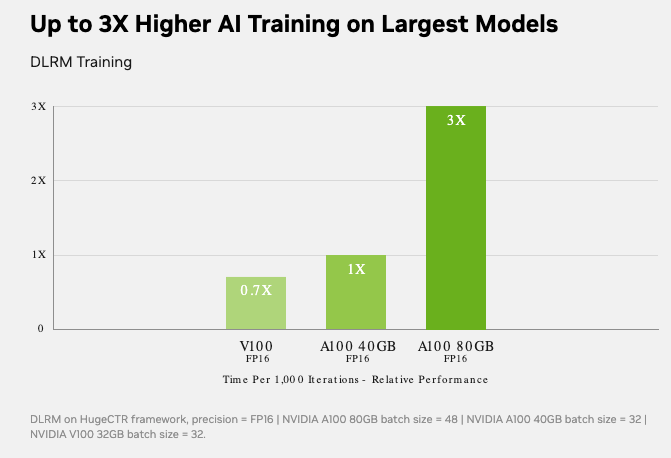
TF32 is particularly important. It allows developers to run FP32 models with much higher performance without rewriting code, delivering major speedups while preserving accuracy. This is one of the reasons A100 saw rapid adoption across existing AI codebases.
In practice, this means teams can move faster without changing their model architecture or training logic.
Memory Architecture and Bandwidth
One of A100’s most important strengths is memory.
The A100 80GB variant uses HBM2e memory, delivering up to 80GB of GPU memory with nearly 2 terabytes per second of memory bandwidth. This matters because many AI workloads are memory-bound, not compute-bound.
Large models, large batch sizes, and long context windows all benefit directly from higher memory capacity and bandwidth. With A100 80GB, teams can train larger models, increase batch sizes, and reduce costly data transfers between GPU and CPU memory.
Compared to earlier GPUs, A100 allows more of the model and data to stay on the GPU, which improves throughput and stability.
A100 SXM variants support NVLink, NVIDIA’s high-speed GPU-to-GPU interconnect. NVLink allows multiple GPUs to communicate at up to 600 GB/s, far faster than PCIe alone.
This is critical for multi-GPU training, model parallelism, and large inference clusters. When GPUs exchange gradients or activations quickly, scaling efficiency improves and training time drops.
On Spheron, SXM-based A100 configurations are clearly labeled, so teams know when they are getting NVLink-capable systems.
Multi-Instance GPU (MIG)
One of the most practical features of A100 is Multi-Instance GPU, or MIG.
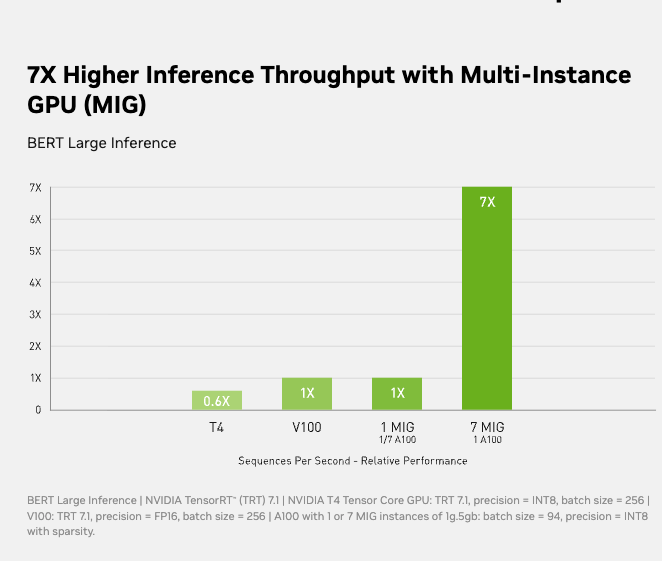
MIG allows a single A100 GPU to be split into up to seven isolated GPU instances, each with its own memory, compute, and bandwidth allocation. These instances behave like independent GPUs.
This is extremely useful for inference workloads, shared environments, and teams running multiple smaller jobs. Instead of underutilizing a full GPU, MIG lets teams pack workloads efficiently while maintaining isolation.
Spheron supports MIG-capable A100 configurations where applicable, making A100 especially cost-effective for mixed workloads.
Real-World Performance Characteristics
On paper, A100 delivers up to 312 TFLOPS of FP16 Tensor performance, with even higher effective throughput when sparsity is enabled. But what matters more is how it behaves in production.
In real systems, A100 delivers stable training throughput, predictable inference latency, and strong utilization without aggressive tuning. Many teams report fewer out-of-memory issues and smoother scaling compared to older GPUs.
A100 also supports strong FP64 performance, which makes it suitable for scientific computing, simulations, and financial modeling where numerical accuracy is critical.
Even with newer GPUs available, A100 remains popular for several reasons. The software ecosystem around A100 is mature. CUDA, cuDNN, TensorRT, RAPIDS, and most AI frameworks are heavily optimized for it. Engineers understand how to debug and tune workloads on A100, which reduces operational risk.
Power consumption is lower than H100-class GPUs, making data center planning easier. Cooling requirements are less aggressive. For many teams, this translates directly into lower total cost of ownership.
When price-to-performance matters, A100 often wins.
Common Use Cases for A100 on Spheron AI
Teams use A100 to train and fine-tune large language models, especially in the 7B to 30B parameter range. It works well for computer vision pipelines, recommendation systems, and multimodal workloads. A100 is widely used for production inference where stability matters more than peak throughput. Enterprises rely on it to power internal copilots, search systems, and analytics platforms.
Researchers and startups use A100 to experiment quickly without committing to expensive long-term infrastructure. Across the market, A100 pricing varies widely. Many providers charge a premium for on-demand access, especially in popular regions.
On Spheron AI, A100 pricing starts as low as $0.76 per hour for SXM-based spot instances. Even on-demand SXM and DGX-backed options remain competitive compared to hyperscalers and single-provider clouds.
Because Spheron aggregates supply, teams avoid the artificial markups often seen elsewhere.
Getting Started with A100 on Spheron AI
Most teams begin with spot A100 to validate workloads and measure performance. Once the workload stabilizes, they move to on-demand or DGX-backed instances for reliability.
Spheron AI provides preconfigured environments for PyTorch, TensorFlow, and modern inference stacks. You get SSH access and full control over your environment. For larger deployments or multi-GPU setups, the Spheron team helps align provider, region, and configuration to match your needs.
Deploying a GPU instance is simple and takes only a few minutes. Here’s a step-by-step guide:
1. Sign Up on the Spheron AI Platform
Head to app.spheron.ai and sign up. You can use GitHub or Gmail for quick login.

2. Add Credits
Click the credit button in the top-right corner of the dashboard to add credit, and you can use a card or crypto as well.

3. Start Deployment
Click on “Deploy” in the left-hand menu of your Spheron dashboard. Here you’ll see a catalog of enterprise-grade GPUs available for rent.

4. Configure Your Instance
Select the GPU of your choice and click on it. You’ll be taken to the Instance Configuration screen, where you can choose the configurations based on your deployment needs. For this example, we are using RTX 4090. You can use any other GPU that is suitable for you.
You can use any GPU of your choice.

Based on GPU availability, select your nearest region, and in the Operating system, select Ubuntu 22.04.

5. Review Order Summary
Next, you’ll see the Order Summary panel on the right side of the screen. This section gives you a complete breakdown of your deployment details, including:
-
Hourly and Weekly Cost of your selected GPU instance.
-
Current Account Balance, so you can track credits before deploying.
-
Location, Operating System, and Storage associated with the instance.
-
Provider Information, along with the GPU model and type you’ve chosen.
This summary enables you to quickly review all details before confirming your deployment, ensuring full transparency on pricing and configuration.

6. Add Your SSH Key
In the next window, you’ll be prompted to select your SSH key. If you’ve already added a key, simply choose it from the list. If not, you can quickly upload a new one by clicking “Choose File” and selecting your public SSH key file.
Once your SSH key is set, click “Deploy Instance.”
Click here to learn how to generate and Set Up SSH Keys for your Spheron GPU Instances.
That’s it! Within a minute, your GPU VM will be ready with full root SSH access.
Step 2: Connect to Your VM
Once your GPU instance is deployed on Spheron, you’ll see a detailed dashboard like the one below. This panel provides all the critical information you need to manage and connect to your instance, and the SSH command to connect.

Open your terminal and connect via SSH; enter the passphrase when prompted. If you have not added a passphrase, simply press Enter twice.
ssh -i <private-key-path> sesterce@<your-vm-ip>
Now you’re inside your GPU-powered Ubuntu server.
When A100 Is the Right Choice
A100 makes sense when you need reliable AI compute at a reasonable cost. It fits teams that value stability, ecosystem maturity, and predictable performance.
If your workloads are hitting memory bandwidth limits or require extremely large models, H100 or B300 may be a better fit. If not, A100 remains one of the smartest choices in the GPU market.
Final Thoughts
The NVIDIA A100 is a proven foundation for modern AI. It continues to deliver strong performance for training, inference, and analytics while remaining cost-effective.
Spheron AI makes A100 accessible without friction. You get transparency, flexibility, and real choice across providers and regions.
If you want dependable AI compute without overpaying for hardware you do not yet need, A100 on Spheron AI is a practical place to start.