The NVIDIA H200 exists for one very specific reason. Modern AI workloads are no longer compute-bound. They are memory-bound. Large language models, long-context inference, retrieval-augmented generation, and multi-modal pipelines all hit memory limits before they hit raw FLOPS. The H200 solves that problem by pushing memory capacity and bandwidth far beyond what H100 offers, while keeping the same Hopper architecture and software ecosystem.
Spheron AI gives teams direct access to H200 GPUs across spot, dedicated, and reserved configurations. You do not need to negotiate with hyperscalers, wait for allocation windows, or lock yourself into long contracts just to get usable H200 capacity.
If your models no longer fit cleanly on H100, H200 is not a luxury upgrade. It is the correct tool.
Why H200 Exists at All
From the outside, H200 looks like a small step from H100. Same Hopper architecture. Same Tensor Cores. Similar power envelope. The difference is memory.
H200 ships with 141GB of HBM3e memory and 4.8 TB per second of memory bandwidth. That is a 76% jump in capacity and over 40% more bandwidth compared to H100. For memory-bound workloads, this changes everything.
.webp)
Models that previously required tensor parallelism across multiple H100s now fit on fewer GPUs. Inference pipelines can run larger batch sizes without spilling to host memory. Long-context workloads stop thrashing memory and start behaving predictably.
This is why H200 often delivers up to 1.9x faster LLM inference than H100, even though raw compute is similar.
NVIDIA H200 vs H100: Detailed Comparison for AI Training and Inference
| Category | NVIDIA H100 | NVIDIA H200 | Why it matters in practice | | --- | --- | --- | --- | | GPU Architecture | Hopper | Hopper (HBM3e upgrade) | Same core architecture, but H200 removes memory bottlenecks | | Memory Type | HBM3 | HBM3e | HBM3e delivers much higher bandwidth and efficiency | | VRAM Capacity | 80 GB | 141 GB | Larger models fit fully in memory without sharding | | Memory Bandwidth | ~3.0 TB/s | ~4.8 TB/s | Bandwidth dominates LLM performance at scale | | Compute (FP16 / BF16 Tensor) | ~1,000 TFLOPS (with sparsity) | ~1,000 TFLOPS (same) | Raw compute is similar; memory is the real upgrade | | FP8 Tensor Performance | Supported | Supported (same) | Training efficiency stays similar | | NVLink / NVSwitch | Yes | Yes | Multi-GPU scaling remains identical | | PCIe / SXM Form Factors | PCIe & SXM5 | Primarily SXM | H200 targets large-scale data center clusters | | Typical Cluster Size | 1–8 GPUs common | 8–64+ GPUs common | H200 shines in large, distributed training | | Power Consumption | ~700 W (SXM) | ~700–750 W (SXM) | Slightly higher power for major memory gains | | Primary Bottleneck | Memory capacity & bandwidth | Compute-bound in many workloads | H200 removes memory as the limiter | | Best Use Cases | Training mid to large LLMs, inference at scale | Training very large LLMs, high-throughput inference | H200 unlocks new model sizes and batch configs |
H200 Is Built for Inference First, Training Second
H200 can train large models, but its real strength shows up in inference and memory-heavy workloads.
If you serve large models like LLaMA-class systems, DeepSeek variants, or long-context RAG pipelines, memory capacity dictates throughput and latency. With 141GB available per GPU, H200 allows you to keep more weights, KV cache, and intermediate activations on-device.
This directly improves token throughput and reduces tail latency. It also simplifies system design. You need fewer GPUs, less sharding logic, and fewer failure points.
For training, H200 shines when batch sizes or model states exceed H100 limits. It does not replace B200 or multi-node Blackwell systems for massive pre-training. But for fine-tuning, continued training, and research-scale runs, it removes painful memory constraints.
Why Teams Choose Spheron AI for H200? Most H200 availability today sits behind enterprise sales processes. You get quoted pricing only after weeks of calls. Capacity depends on vendor allocation. Even then, utilization terms are unclear.
Spheron AI takes a different approach.
You see availability upfront.
You see whether an instance is spot, dedicated, or reserved.
You know the region before deployment.
You know the hourly price before you talk to sales.
More importantly, Spheron aggregates H200 capacity across multiple providers. This avoids single-vendor bottlenecks and keeps pricing closer to real supply and demand instead of artificial scarcity.
H200 Configurations Available on Spheron AI
Spheron AI provides NVIDIA H200 GPUs across multiple deployment models, allowing teams to balance performance, availability, and cost as their workloads mature.
For teams that require maximum stability and sustained performance, Spheron AI offers H200 SXM reserved clusters delivered as full NVIDIA HGX systems. Each node runs 8 H200 SXM GPUs, connected via NVLink and high-bandwidth InfiniBand networking. Reserved pricing improves with longer commitments, making this option well suited for long-running training jobs, large-scale inference pipelines, and production workloads with predictable demand.
For teams that need flexibility or are still scaling usage, H200 SXM virtual machines are available as both spot and dedicated instances. Spot instances provide access to H200 at significantly reduced rates, while dedicated instances guarantee availability and consistent performance without interruption.
This tiered model lets teams start cost-efficiently and move to reserved capacity only when utilization becomes steady, avoiding unnecessary upfront commitments.
H200 SXM Reserved HGX Cluster
The reserved H200 offering is delivered as a full NVIDIA HGX H200 8-GPU SXM system, designed for sustained, high-throughput AI workloads.
Hardware configuration
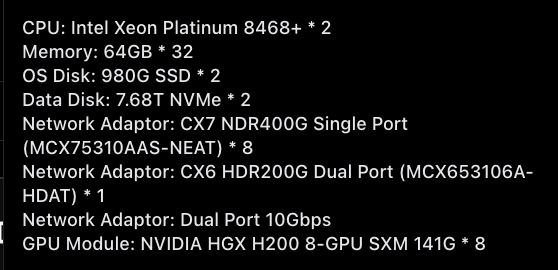
Users will get dual Intel Xeon Platinum 8468+ processors and paired with 2 TB of system memory, configured as 32 × 64 GB DIMMs. The operating system runs on 2x 980 GB SSDs, while data workloads use 2x 7.68 TB NVMe drives for high-throughput storage.
At the core of the system is the NVIDIA HGX H200 SXM platform, with 8 H200 GPUs, each providing 141 GB of HBM3e memory. NVLink interconnect ensures high-bandwidth, low-latency communication across all GPUs.
Networking is designed for multi-node scale. Each node includes eight CX7 NDR 400 Gbps adapters for distributed training, an additional CX6 HDR 200 Gbps dual-port adapter for fabric compatibility, and a dual-port 10 Gbps adapter for management and auxiliary networking.
Reserved pricing (per GPU)
Pricing is billed per GPU per hour and improves with longer commitments:
-
1-month commitment: $1.95/hr per GPU
-
3-month commitment: $1.85/hr per GPU
-
6-month commitment: $1.80/hr per GPU
This configuration is intended for organizations that need predictable throughput, extremely high memory bandwidth, and reliable multi-GPU scaling over long periods.
H200 SXM Virtual Machines (Spot and Dedicated)
Spheron AI also offers H200 SXM GPUs as virtual machines for teams that need more deployment flexibility.
Spot instances
Spot instances provide the lowest-cost access to H200 capacity and are suited for fault-tolerant workloads.
-
Best available spot price: $1.87/hr per GPU
-
Availability: 31 GPUs
-
Typical configurations include around 44 vCPUs, 182 GB RAM, and 200 GB of storage, delivered as virtual machines using the SXM5 interconnect.
Dedicated instances
Dedicated H200 SXM instances guarantee capacity and stable performance without interruption. Pricing starts from $3.23/hr per GPU, with availability across two providers.
Sesterce offers the lowest starting price at $3.23/hr across eight regions, while Data Crunch starts at $3.75/hr across two regions. Supported configurations range from single-GPU deployments to full multi-GPU clusters, allowing teams to scale from development and inference to larger production workloads.
Supported GPU counts
-
1× GPU: from $3.23/hr
-
2× GPUs: from $7.34–$9.00/hr
-
4× GPUs: from $14.52–$15.84/hr
-
8× GPU cluster: from $31.68/hr
Example configurations
-
16 vCPUs, 200 GB RAM, 465 GB storage
-
44 vCPUs, 182 GB RAM, 500/1000 GB storage
Multiple operating systems are supported, including Jupyter-based environments.
Networking and Scaling Matter More Than FLOPS
H200 systems on Spheron AI support modern high-speed networking, including 200G and 400G fabrics in reserved configurations. This matters when you scale inference across multiple GPUs or nodes.
Memory-heavy inference pipelines often saturate interconnects before compute. Proper networking ensures that tensor parallelism and pipeline parallelism do not collapse under load.
This is one of the reasons cheap-looking H200 offers elsewhere often disappoint. The GPU is powerful, but the surrounding system is weak. Spheron exposes system-level details so you can make informed decisions.
Cost Efficiency Comes From Using Fewer GPUs
One mistake teams make is comparing hourly GPU prices in isolation. H200 often reduces total cost because you need fewer GPUs to do the same job. Larger memory means fewer shards. Higher bandwidth means higher utilization. Better throughput means fewer replicas.
When you factor in system complexity, orchestration overhead, and engineering time, H200 frequently wins for large inference systems even if the hourly rate looks higher on paper.
Spot, Dedicated, and Reserved: When to Use Each
Spot H200 instances work well for research, experimentation, and burst inference. They are cost-effective but not guaranteed.
Dedicated H200 instances suit production workloads that need stability without long commitments. You pay more per hour but avoid interruptions.
Reserved H200 clusters make sense when you know your workload will run continuously. Long-term reservations on Spheron AI bring per-hour pricing down significantly and give you full control over hardware.
This flexibility is critical. Most providers force you into one model. Spheron lets you evolve as your workload matures.
Software Compatibility and Ecosystem
H200 runs on the same Hopper software stack as H100. CUDA, cuDNN, TensorRT-LLM, PyTorch, JAX, and vLLM all work without changes.
This matters more than it sounds. Teams can move from H100 to H200 without rewriting pipelines or retraining staff. The performance gain comes from hardware, not refactoring.
That continuity reduces risk, especially in production environments.
When H200 Is the Right Choice
H200 is the right GPU when memory dictates performance. Choose H200 if you run large LLM inference, long-context workloads, retrieval-heavy systems, or memory-bound training. Choose it if H100 feels cramped even after optimization. Do not choose H200 just because it is newer. If your workloads are compute-bound or small enough to fit comfortably on H100, you will not see meaningful gains.
Spheron AI supports both, which means you do not have to guess. You can test, measure, and choose based on data.
Getting Started with B200 on Spheron
Deploying a GPU instance is simple and takes only a few minutes. Here’s a step-by-step guide:
1. Sign Up on the Spheron AI Platform
Head to app.spheron.ai and sign up. You can use GitHub or Gmail for quick login.

2. Add Credits
Click the credit button in the top-right corner of the dashboard to add credit, and you can use a card or crypto as well.

3. Start Deployment
Click on “Deploy” in the left-hand menu of your Spheron dashboard. Here you’ll see a catalog of enterprise-grade GPUs available for rent.

4. Configure Your Instance
Select the GPU of your choice and click on it. You’ll be taken to the Instance Configuration screen, where you can choose the configurations based on your deployment needs. For this example, we are using RTX 4090. You can use any other GPU that is suitable for you.
You can use any GPU of your choice.

Based on GPU availability, select your nearest region, and in the Operating system, select Ubuntu 22.04.

5. Review Order Summary
Next, you’ll see the Order Summary panel on the right side of the screen. This section gives you a complete breakdown of your deployment details, including:
-
Hourly and Weekly Cost of your selected GPU instance.
-
Current Account Balance, so you can track credits before deploying.
-
Location, Operating System, and Storage associated with the instance.
-
Provider Information, along with the GPU model and type you’ve chosen.
This summary enables you to quickly review all details before confirming your deployment, ensuring full transparency on pricing and configuration.

6. Add Your SSH Key
In the next window, you’ll be prompted to select your SSH key. If you’ve already added a key, simply choose it from the list. If not, you can quickly upload a new one by clicking “Choose File” and selecting your public SSH key file.
Once your SSH key is set, click “Deploy Instance.”
Click here to learn how to generate and Set Up SSH Keys for your Spheron GPU Instances.
That’s it! Within a minute, your GPU VM will be ready with full root SSH access.
Step 2: Connect to Your VM
Once your GPU instance is deployed on Spheron, you’ll see a detailed dashboard like the one below. This panel provides all the critical information you need to manage and connect to your instance, and the SSH command to connect.

Open your terminal and connect via SSH; enter the passphrase when prompted. If you have not added a passphrase, simply press Enter twice.
ssh -i <private-key-path> sesterce@<your-vm-ip>
Now you’re inside your GPU-powered Ubuntu server.
Final Thoughts
The NVIDIA H200 is not a flashy upgrade. It is a practical one.
It exists because AI workloads outgrew memory limits faster than compute limits. Spheron AI makes that upgrade accessible without forcing teams into hyperscaler pricing or opaque contracts.
If memory is your bottleneck today, H200 on Spheron AI is one of the most straightforward ways to remove it and move forward.